

Backlinks Monitor
See which websites link to yours, month by month.
Backlinks Monitor keeps track of the other websites that link to yours: your linking sites. On Free, it shows how many sites link to you and your authority score out of 100. On Premium, this is checked every month, without you doing anything. You see how many sites are new and lost each month. You also get a list of up to 1,000 linking sites. Each shows its authority, when known, and the date it first linked to you.
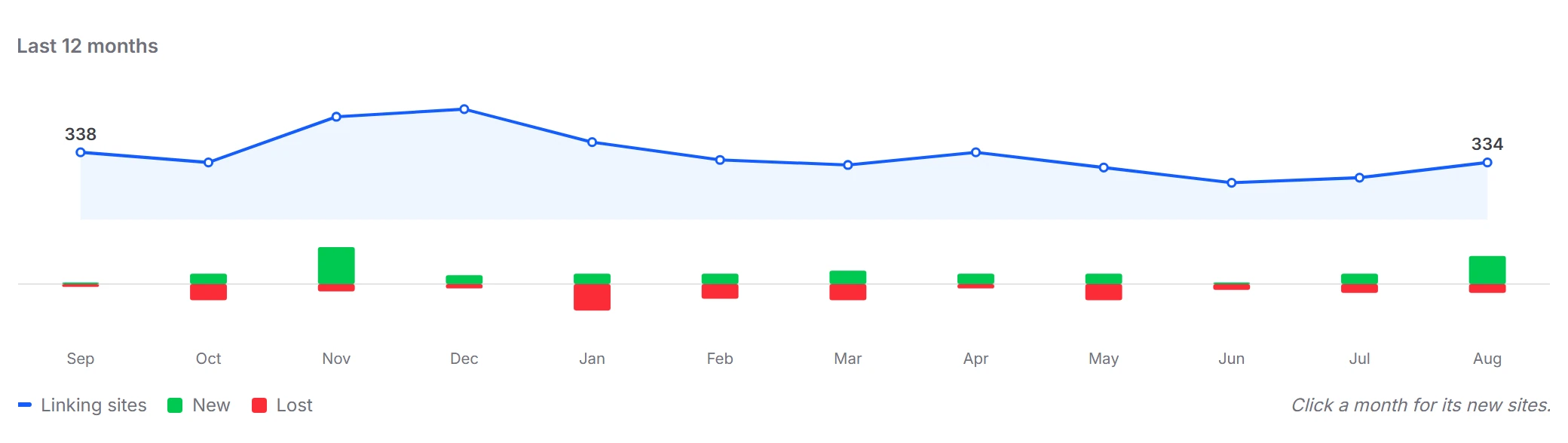
Last 12 months
12 months of new and lost linking sites in one chart
Backlinks Monitor counts each linking site once, however many links it has. Links from your own website are left out. Experts call these sites referring domains.
The Last 12 months chart draws the total number of linking sites as a line, month by month. The first and last totals sit at the ends of the line. One look tells you if you gained or lost linking sites over 12 months.
For each month, a green bar up shows the sites that started linking to you. A red bar down shows the sites that stopped. Point at a month for its exact figures, such as “August 2026: 120 linking sites, 5 new, 2 lost”.
- Total linking sites per month, 12 months back
- Green bars: sites that started linking that month
- Red bars: sites that stopped linking that month
- Exact figures when you point at a month
Strongest links
Up to 1,000 linking sites, strongest first
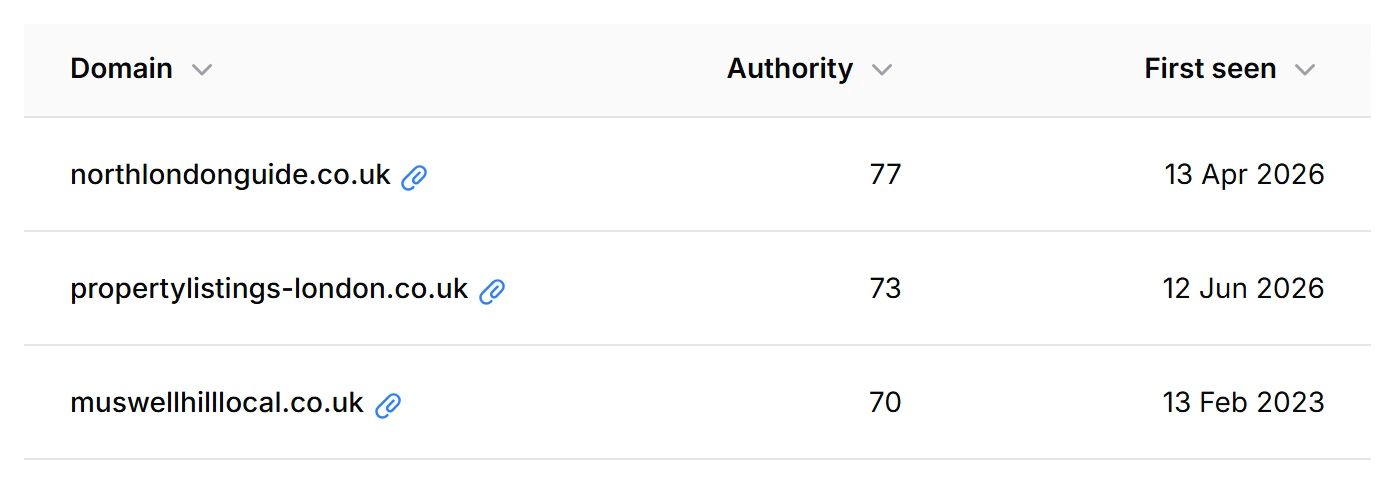
The Strongest links table lists every site that still links to your website, strongest first. Each row shows the domain, its authority and the date its first link to you was found, so you also see how long a site has linked to you.
Authority is a score from 0 to 100 for how strong a website is: the more and the stronger the sites that link to it, the higher the score.
Click the paperclip after a domain to see the pages on that site where a link to you was found, up to three per site, each with its title and address.
- Domain, authority from 0 to 100 and first seen date
- Every column sortable, empty values always last
- Search on a domain or on the title of a linking page
- Filters: authority, first seen dates, new in the last 3 months
- Up to 1,000 linking sites, 25 rows per page or 15, 50 or 100
New per month
Click a month. See which sites started linking to you.
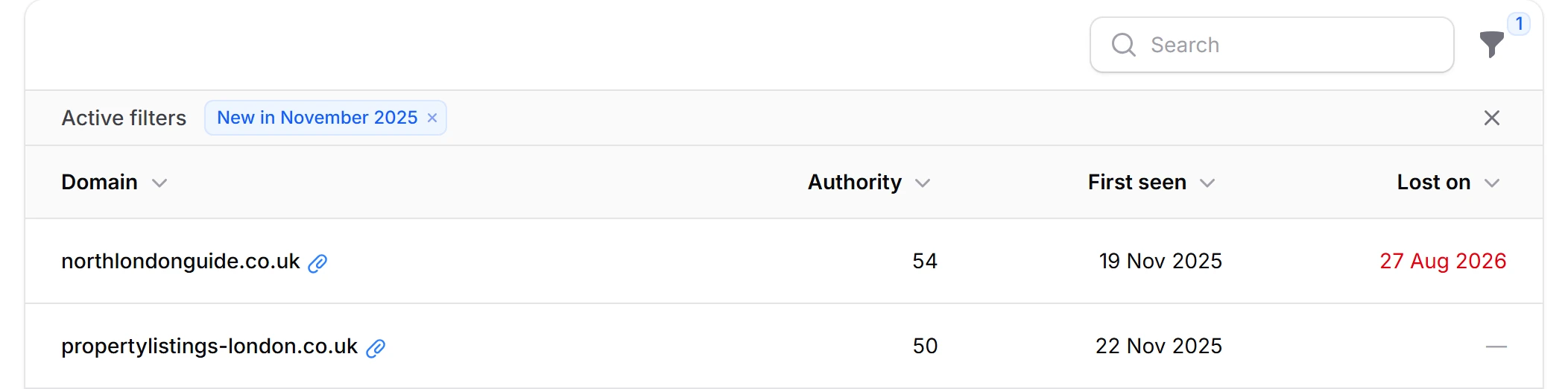
Click a month in the chart and the table switches to the sites that first linked to you in that month. A label above the table, such as “New in August 2026”, tells you which month you are looking at. Remove the label to go back to all sites, or pick another month in the filter.
Sites that stopped linking stay in this list. A red Lost on date shows the day their link was gone. So you see what a month brought, and how much of it still links to you. The Status filter splits the month into Still linking and Lost.
Were you in the local paper that month? The month view shows if that site linked to you. It covers the 200 newest sites that first linked to you in the last 12 months.
- A label with the month you picked
- Lost on: the day a site stopped linking
- Status filter: Still linking or Lost
- The month stays in the page address, ready to bookmark
- Covers the 200 newest linking sites of the last 12 months
Backlinks Monitor on Free and Premium
| What you get | Free | Premium |
|---|---|---|
| Linking sites tile: how many sites link to you | Yes, real numbers | Yes |
| Authority tile: your score out of 100 | Yes, real numbers | Yes |
| Last 12 months chart with the number of new and lost sites | No | Yes |
| Strongest links table with authority and first seen | No | Up to 1,000 sites |
| New sites per month, with Lost on date | No | Yes, the 200 newest of the last 12 months |
| Linking pages per site | No | A few per site, up to 3 per web address |
| Short notes under the tiles: new sites last month, such as “+19 in August”, and the competitor you beat on authority | No | Yes |
| Updates | In the background when you open the page and figures are over a month old, for up to 3 websites per account per day | Automatically, every month |
| Price | €0 | €19.95 per location per month or €199 per location per year, excl. VAT, cancel any time |
Frequently asked questions
What is the difference between a backlink and a linking site?
A backlink is one link from another website to yours. A linking site, or referring domain, is the website that link is on. Backlinks Monitor counts sites, not links: a site with 40 links to you counts once. Links from your own website are left out.
What does the authority score mean?
Authority is a score from 0 to 100 for a whole website. It is based on the sites that link to that website and their own scores. Higher means more and stronger linking sites. Your own score sits in the Authority tile, such as “34 of 100”. Your free check report shows the same score.
Why do some linking sites show “—” as authority?
Their score is not known. Backlinks Monitor reads the scores from the strongest links to your website, up to 1,000 links. A site with no link among them shows “—” and comes last in the table.
Can I check my backlinks for free?
Partly. Free shows how many sites link to you and your authority score. Your free check report includes both numbers too. Which sites they are comes with Premium, with the 12-month chart, the new sites per month and the linking pages. Premium costs €19.95 per location per month or €199 per location per year, excl. VAT. Cancel any time.
How often are the figures updated?
On Premium, once a month: figures older than 30 days are refreshed automatically. A location that just switched to Premium is checked straight away. On Free, a refresh starts in the background when you open the page. It runs when the figures are missing or over a month old, for up to 3 websites per account per day. Under the page heading you see the date of the figures and the date of the next update.
Why do my numbers differ from other tools?
Every tool searches the web in its own way, so counts differ. All figures in Backlinks Monitor are estimates. It also counts sites, not single links, and leaves out links from your own website.
Does Backlinks Monitor work for every location?
It works in every country, because linking sites and authority do not depend on country or language. It does need a website of its own: a Facebook, Instagram, Tripadvisor or Booking.com page counts as no website. Locations on the same website share the same figures, because they belong to the website.
Can I compare my website with my competitors?
Not side by side. On Premium, Backlinks Monitor also measures the authority of the competitors you track that have a website. When you score higher than one of them, the Authority tile names the strongest one you beat, such as “higher than Mersey Homes”. Their own scores are not shown.
Related
Find out how many sites link to your website.
Start with a free check. Your report counts the sites that link to your website and gives it a score from 0 to 100. No card needed.